
SAT
5
AUG
THURS
3
AUG
Hello, Caspar
Today
warning

username
don’t have an account?
password
log in
SIGN UP

BELEAF

beleaf
[TIMELINE]
1 week
[ROLE]
Product Designer/Developer
[TEAM]
Just me and a partner!
[TOOLS]
Python, C/C++, Embedded Systems, Figma
[CONTEXT]
Falls are one of the most common safety risks for seniors
Beleaf is a fall detection system designed to ensure seniors can receive immediate help in emergencies. This project includes both a physical wearable device and a mobile alert application that notifies emergency contacts when a fall is detected.
Inspired by my grandmother’s fall in her backyard, I wanted to explore how technology could provide fast, reliable support while maintaining simplicity for older users. Over the course of one week, my partner and I researched senior safety needs, built an embedded fall detection system, and designed an accompanying mobile interface to connect caregivers with real-time alerts.
[PROBLEM]
I interviewed 6 caregivers and family members to understand how they support senior safety
Our research goal was to identify key pain points in emergency response and everyday safety, and explore how a faster solution like beleaf could better meet their needs.
Emergency support often arrives too late
Seniors living independently may experience falls without anyone nearby to assist them, and existing alert systems can be difficult to use or feel stigmatizing.
Safety systems can feel clinical or intrusive
Many seniors dislike wearing bulky medical alert devices
Caregivers struggle with uncertainty
Family members worry when loved ones don’t answer their phone but hesitate to constantly check in.
Emergency response is often delayed
If a fall occurs and the phone isn’t nearby, seniors may be unable to call for help.
[PROTOTYPE]
Introducing a smarter way to keep loved ones safe
A single, easy-to-use app where users can access real-time alerts, report incidents, and connect with trusted people nearby, helping them stay informed and feel safer while navigating public spaces.

Onboarding

Emergency SOS

Calendar
Edit Profile
[IDEATION]
Building the embedded system
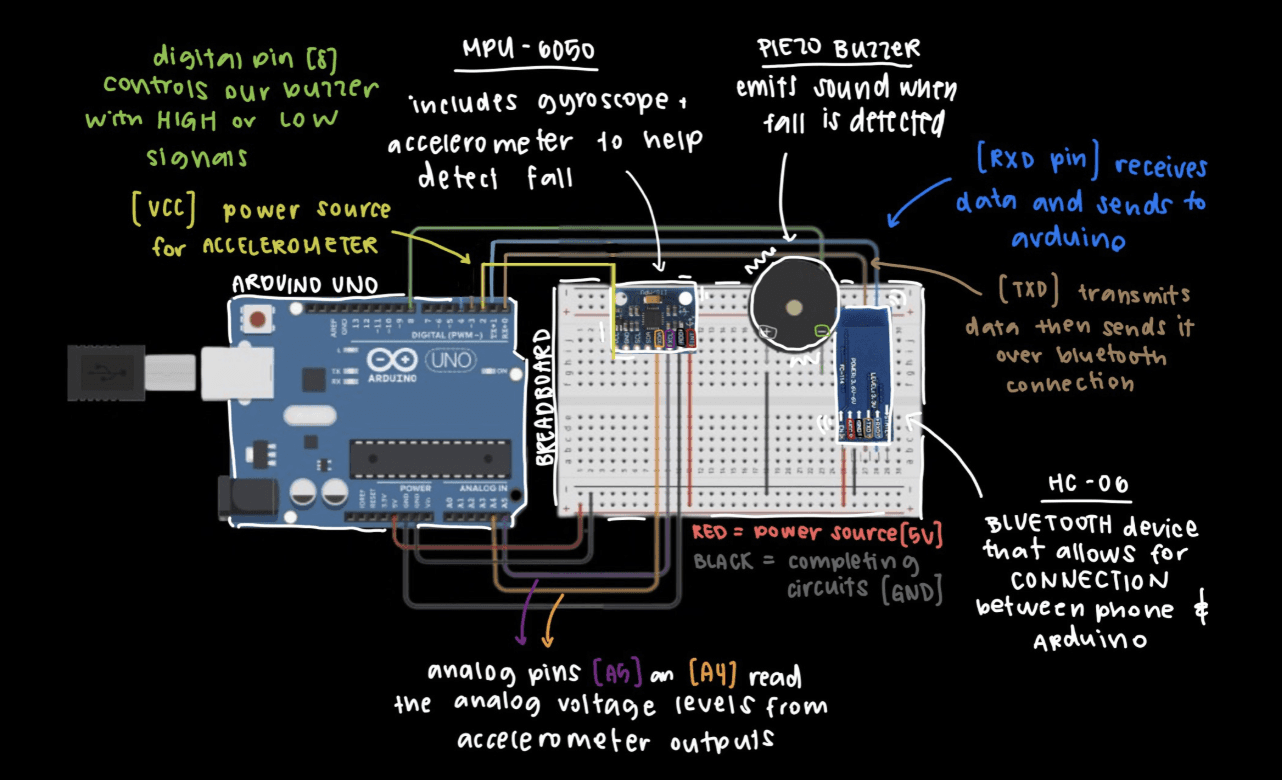
We began by separately wiring and experimenting the 3 main components to our Arduino setup. In our circuit diagram shown on the right, our sensor on the far left is a MPU6050 which is a Gyroscope and Accelerometer combined that measures movement of the device. Our actuator in the middle is a Piezo Buzzer which emits sound. And on the right is the HC-06, which is a Bluetooth module that allows for connection between our Arduino code and Android. After ensuring the sensor and actuator work, we reached our set MVP.
Programming the System
Our device works by first reading the data from the Accelerometer and Gyroscope. Arduino then analyzes the data to detect if a fall occurred. If there is a fall, the buzzer would sound and a text message would be sent, and if not, there would be no tone from the buzzer and it would loop back.

To be more specific, the code works by having three triggers and based on what is calculated by the amplitude vector, the triggers could be set as on or off. If all three triggers activate in a certain order, a fall is detected, which then a buzzer sounds and connects to a Python code where a text message is sent through SMTP library.

Testing the System
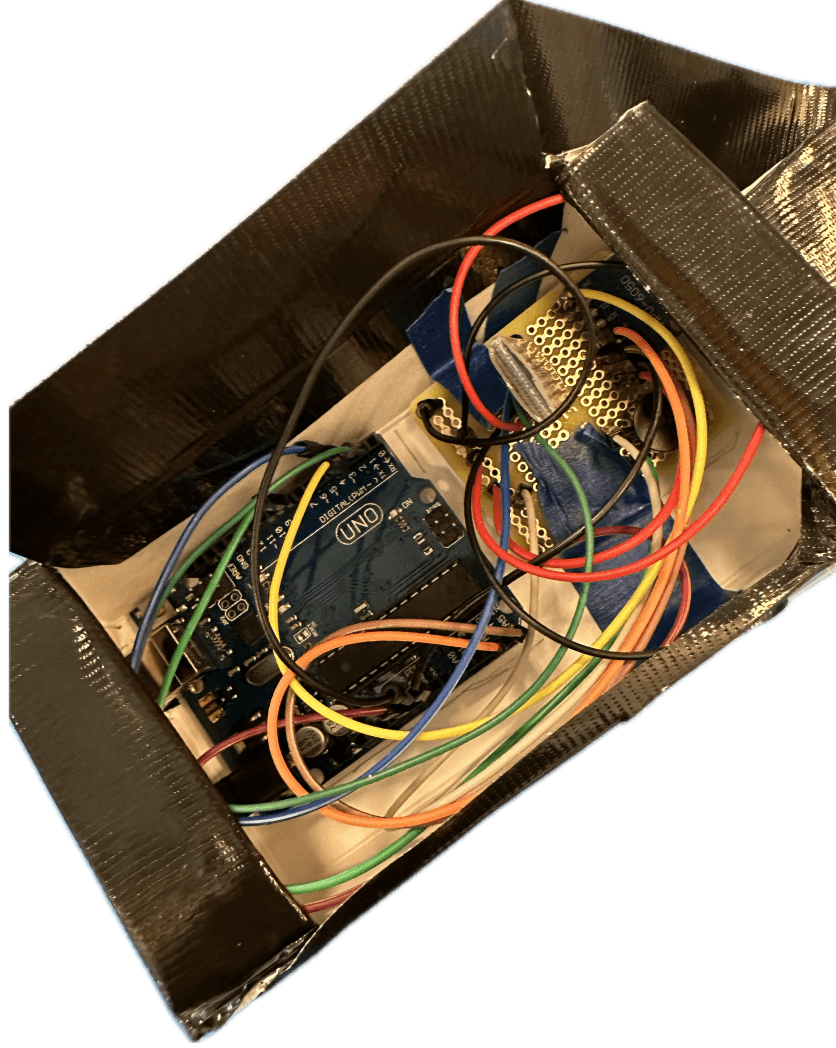
On the bottom left corner is our physical device reenacting what a fall might look like, and on the top right corner is what your emergency contact receives when the code is ran.
Building the emergency alert app
Following our MVP, we decided to expand our project further by creating a functional app with a manual button using MIT App Inventor. We block-coded an app that turned on the buzzer when the button ‘ON’ or ‘OFF’ was clicked. Essentially after the device is connected through Bluetooth, it either sends a ‘1’ or ‘0’ to Arduino, prompting the buzzer. Additionally, users can input their own emergency number to send an alert message to.

Testing the app
After connecting to bluetooth, pressing ‘on’ will send a text message to your emergency contact number that was entered at the beginning.
Designing the UI interface with simplicity in mind
The UI for beleaf was designed to reflect the same core values as the physical device: clarity, speed, and emotional comfort. Since the product supports users in high-stress moments, every decision, from typography to layout, focused on reducing friction and promoting trust.

Visual Direction
We adopted a soft, friendly visual language using:
warm, calming colors to reduce anxiety
rounded UI elements to make the experience feel approachable
large touch targets and minimal text for accessibility, especially for elderly users
Wireframing and Structure
We started with low-fidelity wireframes to map out essential user flows, including:
the onboarding process
an emergency button
a personal calendar
[SOLUTION]
Immediate help when it matters the most
No waiting or searching for a phone: the device detects falls automatically and alerts emergency contacts, while the companion app allows users to send help with a single tap.
Onboarding
Emergency SOS
Calendar
Edit Profile
[DESIGN DECISIONS]
Designing for vulnerability requires empathy
Creating a product for seniors and older users pushed me to prioritize accessibility, simplicity, and emotional clarity over visual complexity.
Hardware and software must work in harmony
Building both the physical and digital sides of beleaf taught me how important it is to align form, function, and usability.
Storytelling adds meaning
Grounding the project in my grandma’s real-life experience gave the design purpose and reminded me why human-centered design truly matters.